Fixing the “Invisible Lead” Problem: Iframe Tracking Without URL Change
How we recovered missing conversion data by engineering a custom Google Tag Manager listener for a high-stakes lead generation infrastructure where form submissions happened entirely inside iframes.
Case Study Outcomes
Tracking Accuracy
Meta Lead Events
Retargeting Signals
The Invisible Conversion Gap
Client Meta Ads par budget spend kar rahe the aur leads bhi generate ho rahi thi, lekin analytics dashboard par “Zero Conversions” show ho raha tha. Yeh sirf ek tracking issue nahi tha — yeh direct optimization aur revenue visibility problem thi.
The Technical Blindspot
Why traditional GTM tracking failed.
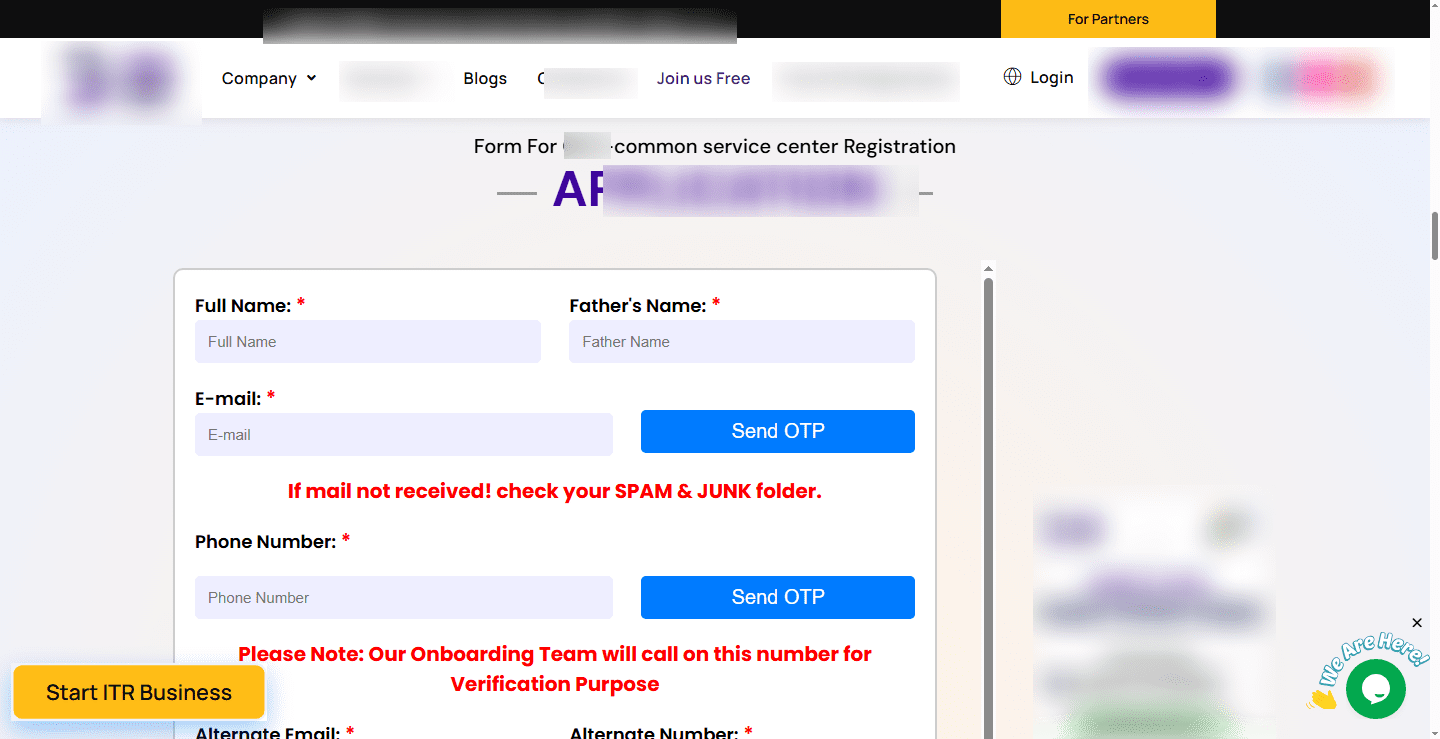
The form was embedded inside a same-domain iframe.
The thank-you page loaded inside the iframe after successful form submission.
The main page URL never changed, so the existing parent-page GTM tracking setup did not detect the conversion.
The iframe completed its internal navigation, but the parent page's existing conversion trigger did not fire.
The real challenge: Leads were being generated, but the existing tracking implementation could not connect successful iframe submissions to the conversion events needed for measurement and optimization.
The Custom Tracking Bridge
Since traditional GTM triggers failed to capture the submissions, we engineered a custom iframe listener system capable of detecting the internal thank-you state without relying on changes to the main page URL or standard parent-page pageview events.
Identifying the Source
The lead generation form was embedded using a same-domain iframe. After successful submission, the thank-you state loaded entirely inside the iframe while the main page URL remained unchanged.
Because the parent page never refreshed or navigated, traditional GTM pageview-based conversion tracking failed to identify the submission.
Custom Event Trigger
We deployed a custom HTML listener capable of monitoring the relevant same-origin iframe activity and detecting the thank-you state dynamically.
Once detected, the listener pushed a clean custom event into the GTM Data Layer, making it available for conversion measurement.
How the Custom Tracking Bridge Works
Data Layer Push
The detected submission event was pushed into the Data Layer to activate the configured GTM custom event triggers.
Platform Sync
The custom conversion event was mapped to Meta Pixel and GA4 for cross-platform conversion reporting and campaign optimization.
From Blind Spend to Data Clarity
The implementation transformed the client's marketing measurement setup from missing conversion data into a trackable, optimization-ready system.
Leads Generated. Conversions Missing.
Ad campaigns were generating leads, but no conversion data was reaching Meta Ads Manager. Optimization algorithms had no reliable learning signal.
Lead Events Captured. Data Restored.
Real-time Lead events now fire through the configured Meta Pixel and GTM setup, supporting campaign optimization, audience building and conversion reporting.
Key Implementation Results
Reported Case Study OutcomesThe 100% data accuracy figure is retained from the original case study. Its measurement scope and validation method should be documented before publication.
Ready to Fix Your Tracking?
If your conversions are hidden inside iframes, third-party forms or broken analytics setups, we can assess your tracking stack and design an appropriate measurement solution.
How We Validated the Tracking Fix
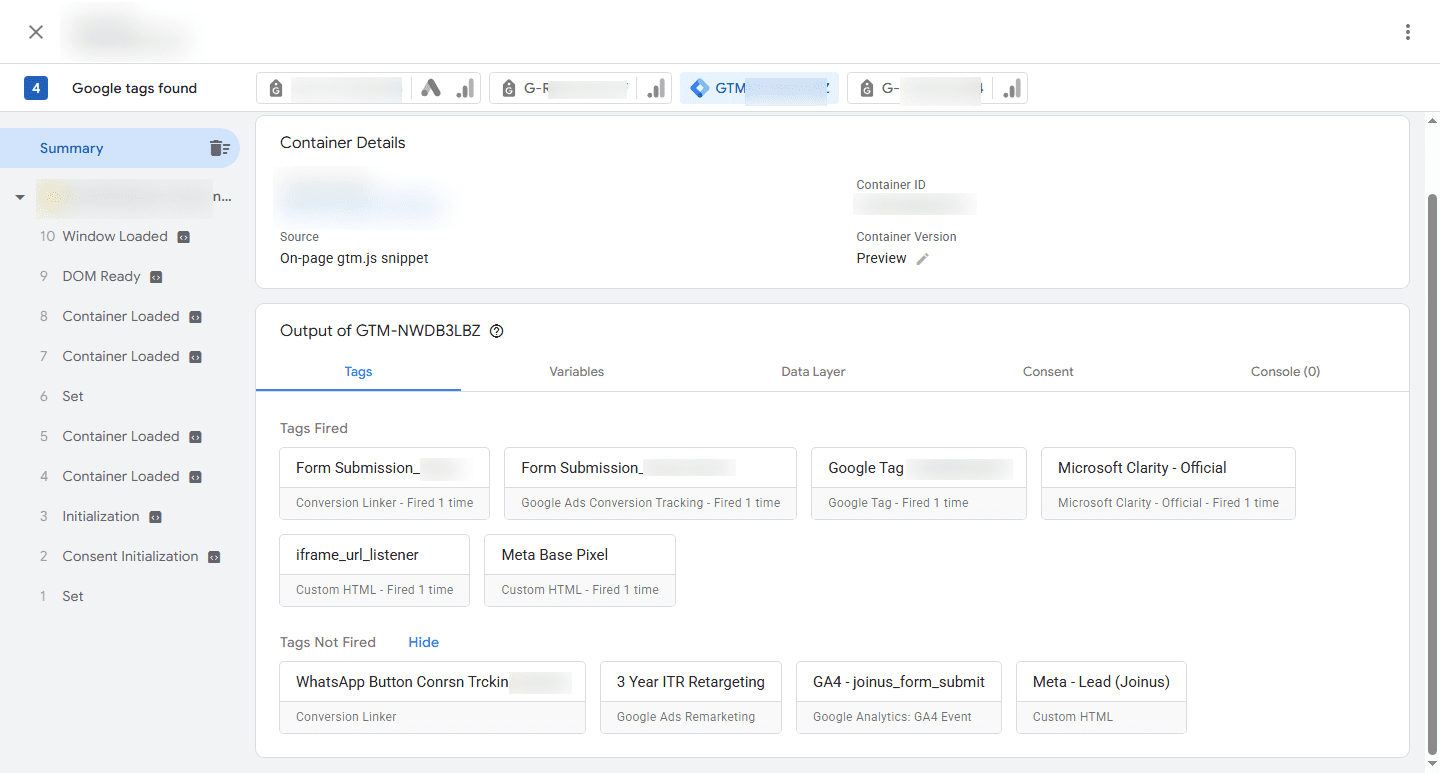
A conversion tracking fix is only useful when successful lead submissions can be detected and passed to the measurement platforms. The GTM event evidence from this case study illustrates the custom iframe detection mechanism.
Submit the Form
Test a successful submission inside the embedded iframe.
Detect the Thank-You State
Confirm that the custom listener responds to the internal iframe state.
Inspect the GTM Event
Check that the custom event appears in GTM Preview.
Verify Platform Events
Check the corresponding GA4 and Meta Lead signals.
What Needs to Be Verified?
These checks help determine whether an iframe submission is measured correctly across the tracking stack.
Confirm that the expected custom Data Layer event fires after a successful submission.
Confirm that the intended Lead event is received and is not duplicated.
Check that the relevant event is received with the expected parameters.
Verify that failed or incomplete submissions do not generate Lead events.
How Should Tracking Accuracy Be Measured?
To support a numerical tracking accuracy claim, compare independently confirmed successful form submissions with matching, correctly recorded conversion events.
This calculation is a proposed validation method, not an independently verified numerical result for this case study. Duplicate or false-positive events should also be checked separately.
Key takeaway: Reliable conversion tracking requires more than detecting an iframe thank-you state. The corresponding GTM, GA4 and Meta events should be checked for successful capture, duplicates and false positives before declaring the measurement setup accurate.
Key Takeaways & Technical Limitations
This case study demonstrates why conversion tracking can fail when successful form submissions happen inside an iframe. The solution depends on how the iframe is implemented, which events are accessible and how those events are connected to analytics platforms.
URL Changes Are Not Always Required
A successful form submission may happen without navigating the main website. Conversion tracking should be based on a reliable success signal, rather than depending only on parent-page URL changes.
Iframe Origin Determines Tracking Options
Same-origin iframes can permit parent-page scripts to inspect their content, subject to browser and iframe restrictions. Cross-origin iframes generally block direct DOM access.
Data Layer Events Improve Measurement
A well-defined GTM Data Layer event can connect a verified successful submission with analytics and advertising tags without relying on standard pageview triggers.
Event Verification Is Essential
Detecting the thank-you state is only one part of the solution. Successful events should be verified in GTM, GA4 and Meta, with checks for duplicates, false positives and consent.
Same-Origin vs Cross-Origin Iframe Tracking
The approach used in this case study involved a same-domain iframe. Different iframe architectures can require different tracking methods.
Same-Origin Iframe
When the iframe and parent document share the same origin, scripts may be able to access the iframe document and observe its thank-you state.
- ✓ Detect internal navigation when browser access permits
- ✓ Monitor an accessible success state
- ✓ Push verified events to the GTM Data Layer
Cross-Origin Iframe
If an iframe is hosted on a different origin, the browser's same-origin policy prevents the parent page from freely reading its internal document.
- ✓ Use a supported form-provider callback or integration
- ✓ Use postMessage communication when the iframe can cooperate
- ✓ Validate message origins and verify successful submission
Technical clarification: A shared domain name alone does not guarantee same-origin access. The protocol, hostname and port must match, and additional iframe restrictions may apply. The listener approach described in this case study should not be assumed to work with every third-party embedded form.
The Biggest Lesson from This Case Study
Reliable conversion tracking starts with understanding how a successful lead submission actually occurs. In this implementation, detecting the internal iframe thank-you state and passing a custom event into GTM restored a measurable conversion signal without changing the main website URL.
The iframe architecture and custom listener described above are specific to this case study. Alternative forms, domains, browser restrictions and consent configurations may require a different implementation.